


ConnectEBT
4.67.48K Reviews
App Specs
- Version
- 2.4.0(20260612)
- Updated On
- License
- Free
- Downloads
- 1,000,000+
- Developer
- Conduent Incorporated
- Categories
- Finance
- Platform
- Android, iOS
Screenshots
 Analysis by AppCompare
If you’ve ever found yourself juggling multiple things at once and wishing there was an easier way to manage your EBT benefits, then let me tell you, ConnectEBT might just become your new best friend. I’ve been testing this app for a week now, and I’m here to spill all the juicy details about its features, potential hang-ups, and whether it’s worth a spot on your home screen.
Getting Started with ConnectEBT
First things first, downloading ConnectEBT is a breeze. It’s available on both Android and iOS, so no matter your device loyalty, you’re covered. Once installed, the setup process is straightforward. You just need your EBT card number and a few other personal details to create an account. I found this part to be pretty painless, but make sure you have your card handy to avoid any hiccups.
User-Friendly Interface
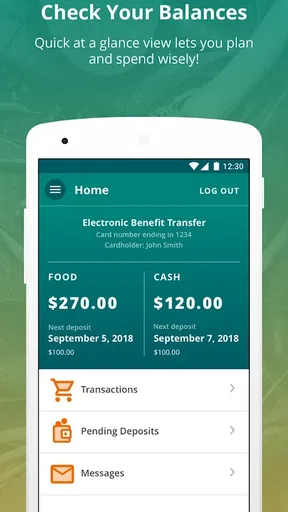
As soon as I logged in, I was greeted by a clean and intuitive dashboard. The app’s design is simple but effective, which is perfect for someone like me who doesn’t have time for unnecessary complications. The main screen shows your current balance right at the top. No need to dig through menus or screens, which is a total win in my book.
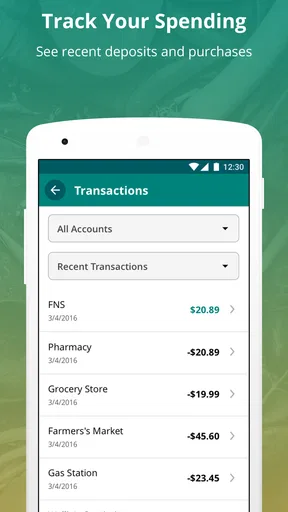
Below your balance, you’ll find recent transactions. This is super handy for keeping track of where your benefits are going. I was able to scroll through my history and see exactly which purchases were made and when. It’s like having a mini bank statement right in your pocket!
Features that Stand Out
One feature I found particularly useful is the ability to view your transaction history. Not only does it show you the date and amount spent, but it also gives you details about the location where the purchase was made. This kind of transparency is crucial for budgeting and ensuring your benefits are being used wisely.
Another neat feature is the alerts. You can set up notifications for when your balance is low or when benefits are deposited. It’s like having a personal assistant reminding you to check your funds, which is great for avoiding any unpleasant surprises at the checkout.
Potential Drawbacks
While ConnectEBT offers a lot of conveniences, it’s not without its flaws. The app requires a stable internet connection to function optimally, which might be a drawback if you’re often in areas with spotty service. There were a couple of times I experienced minor delays when loading transaction details, but nothing too disruptive.
Worth Reading Before You Choose

EA SPORTS FC Mobile 26 Is a Bigger Football Game, but It Takes Time

Flipboard Shows What News Apps Must Do Beyond the Feed

Switching to Android Auto Means Rethinking Your Driving Routine

Google Calendar Makes a Crowded Week Easier to Manage

Ludo King Makes the Most of the Minutes Between Plans

Baby Panda World Brings Quick Play to Modern Phones, but Its Game Library Feels Busy
Additionally, while the app is generally user-friendly, it could benefit from a more detailed help section for newcomers unfamiliar with EBT systems. Fortunately, there’s a customer support option, so you’re not entirely on your own if you hit a snag.
Final Thoughts
After spending some quality time with ConnectEBT, I can confidently say that it’s a game-changer for anyone relying on EBT benefits. It simplifies the process of managing your funds and provides a level of transparency that’s often missing in other financial apps. The alerts and transaction history features are particularly helpful for staying on top of your spending.
Sure, it has a couple of quirks, but the benefits far outweigh any minor inconveniences. If you’re looking to streamline your benefits management, I’d recommend giving ConnectEBT a try. It’s made my life a whole lot easier, and I bet it could do the same for you.
Pros
- User-friendly interface for easy navigation.
- Real-time balance updates enhance convenience.
- Secure login protects user data effectively.
- Supports multiple states for broader accessibility.
- Transaction history helps track spending easily.
Cons
- Limited features beyond balance checking.
- Occasional glitches may disrupt functionality.
- Requires stable internet for optimal use.
- No offline mode for viewing past transactions.
- Customer support response time can be slow.
FAQs for ConnectEBT
What is ConnectEBT and what can I use it for?
ConnectEBT is an app designed to help users manage their Electronic Benefits Transfer (EBT) accounts. You can use it to check your balance, review recent transactions, and ensure your benefits are being used effectively. It's a convenient tool for anyone relying on EBT for food assistance or other benefits.
How do I set up my account on ConnectEBT?
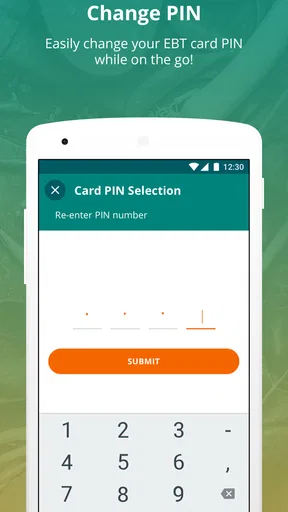
Setting up your account on ConnectEBT is straightforward. First, download the app from your device’s app store. Open the app and select ‘Register’. You’ll need to enter your EBT card number, PIN, and other personal information. Once verified, you can access your account anytime.
Is ConnectEBT secure to use for managing my benefits?
Yes, ConnectEBT is designed with security in mind. It uses encryption to protect your personal and financial information. Additionally, users must enter a secure PIN to access their account, ensuring that your data remains safe and secure from unauthorized access.
Can I use ConnectEBT without an internet connection?
No, ConnectEBT requires an internet connection to function. The app needs to access real-time information from your EBT account, which is only possible through a stable internet connection, whether it’s Wi-Fi or mobile data. Ensure you have connectivity when checking balances or transactions.
What should I do if I encounter issues with the ConnectEBT app?
If you experience any issues with ConnectEBT, first check your internet connection. If the problem persists, try restarting the app or your device. For further assistance, you can contact customer support through the app’s help section or visit the official website for more guidance.


